packjson 脚手架常用库
react-app-rewired customize-cra 的 CRA 2.0 兼容的 rewire
"build": "react-app-rewired build",
chalk 带颜色的 log
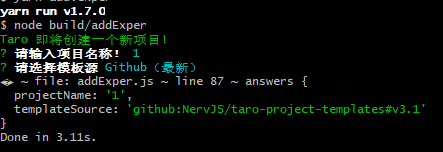
inquirer 交互式命令行用户界面,脚手架常用来作为选择器使用
点击查看代码
const inquirer = require('inquirer');
const chalk = require('chalk');

const askTemplateSource = async function (prompts) {
    let localTemplateSource = DEFAULT_TEMPLATE_SRC

    const choices = [
        {
            name: 'Gitee(最快)',
            value: DEFAULT_TEMPLATE_SRC_GITEE
        },
        {
            name: 'Github(最新)',
            value: DEFAULT_TEMPLATE_SRC
        },
        {
            name: '输入',
            value: 'self-input'
        }
    ]

    if (localTemplateSource && localTemplateSource !== DEFAULT_TEMPLATE_SRC && localTemplateSource !== DEFAULT_TEMPLATE_SRC_GITEE) {
        choices.unshift({
            name: `本地模板源:${localTemplateSource}`,
            value: localTemplateSource
        })
    }

    prompts.push({
        type: 'list',
        name: 'templateSource',
        message: '请选择模板源',
        choices
    }, {
        type: 'input',
        name: 'templateSource',
        message: '请输入模板源!',
        when(answers) {
            return answers.templateSource === 'self-input'
        }
    })
}

async function ask() {
    let prompts = []
    prompts.push({
            type: 'input',
            name: 'projectName',
            message: '请输入项目名称!',
            validate(input) {
                if (!input) {
                    return '项目名不能为空!'
                }
                if (fs.existsSync(input)) {
                    return '当前目录已经存在同名项目,请换一个项目名!'
                }
                return true
            }
        })

    await askTemplateSource(prompts)
    console.log(chalk.green('Taro 即将创建一个新项目!'))
    const answers = await inquirer.prompt(prompts)
    console.log("🚀 ~ file: addExper.js ~ line 87 ~ answers", answers)
};

ask()
ora 修改终端文字颜色
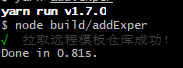
点击查看代码
const ora = require('ora');
    const spinner = ora(`正在拉取远程模板...`).start()
    spinner.color = 'green'
    spinner.succeed(`${chalk.grey('拉取远程模板仓库成功!')}`)
download-git-repo 从 git 地址下载文件
等于 git clone 操作,下载一个文件夹到本地指定目录
点击查看代码
import * as download from 'download-git-repo'
download('flippidippi/download-git-repo-fixture', 'test/tmp', function (err) {
  console.log(err ? 'Error' : 'Success')
})